OpenAI’s Intelligent UI lets GPT-6 combine text, visuals and interactive controls in a ChatGPT answer. Depending on your question, the response can include charts, buttons, forms or a small tool you use directly in the conversation. A simple question can still receive a plain text answer.
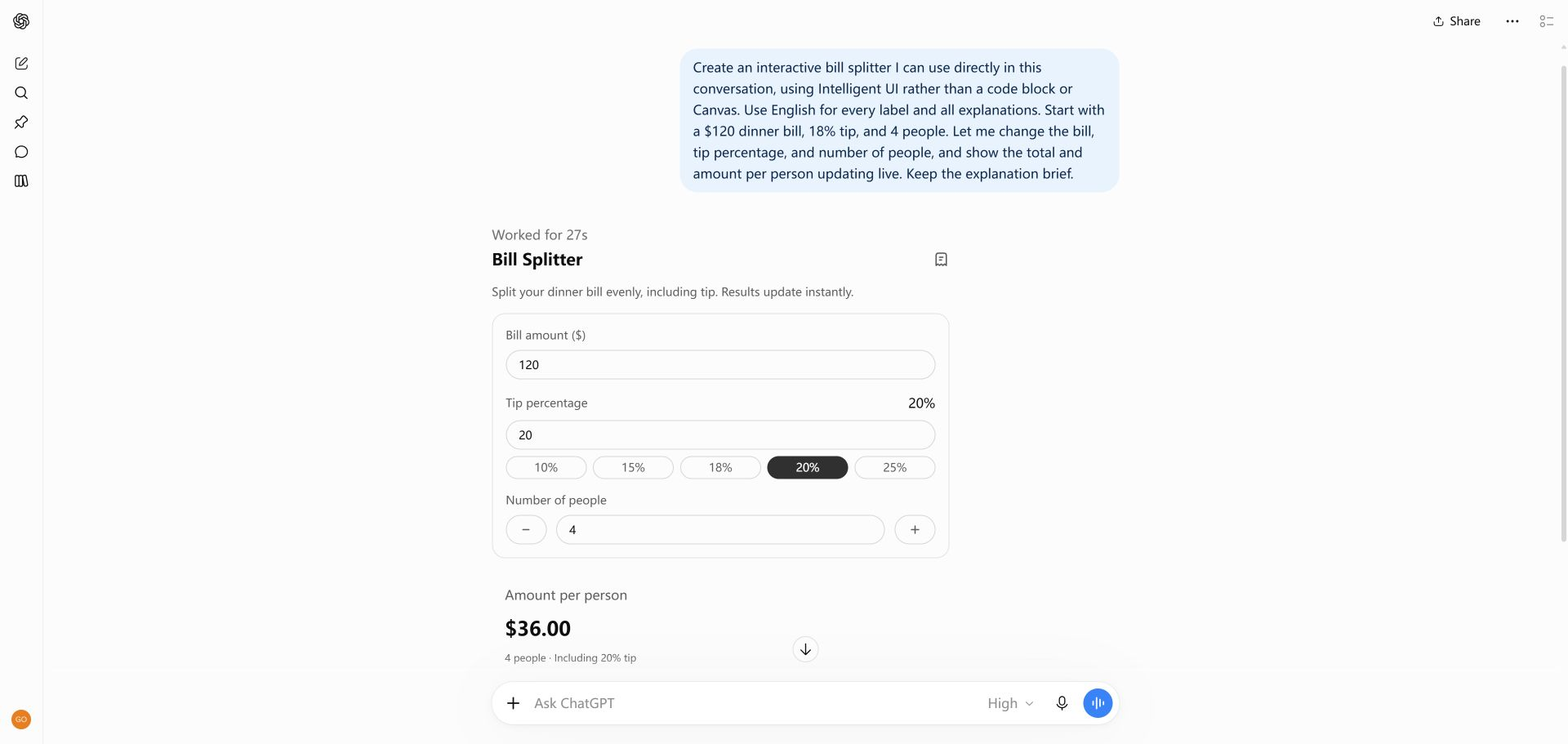
This independent guide focuses on the ChatGPT feature, rather than the broader research topic of intelligent user interfaces. Start with our three tested projects: an adjustable bill splitter, a workshop registration form and a solar system quiz.
The calculator above is a website demo. The tutorial screenshots show what we actually tested in ChatGPT. Your result may look different as the product changes.
An interactive response is useful when you want to change an input, compare a few scenarios, or work through a decision step by step. Try a savings calculator to compare assumptions, a quiz to answer one question at a time, or a chart explanation to inspect a pattern in data.
The control should help you understand or complete the task. If you only need a definition or a short fact, a text answer may be clearer. Ask ChatGPT for the result you need, then check its explanation, inputs and output.
Who can use Intelligent UI in ChatGPT?
OpenAI currently lists access for eligible Free, Go, Plus, Pro, Business and Enterprise accounts. Intelligent UI works in Chat with GPT-6 at Instant through Extra High on supported web and updated app clients. Rollout timing, account eligibility and Enterprise workspace settings can affect access; the GPT-6 Pro reasoning option does not support the feature. See the official Intelligent UI guide for current availability, or use our troubleshooting guide if the interface is missing.
Try three tested Intelligent UI prompts
Copy a starting recipe into ChatGPT, then check the controls and results for yourself.
Create an interactive bill splitter I can use directly in this conversation, using Intelligent UI rather than a code block or Canvas. Use English for every label and all explanations. Start with a $120 dinner bill, 18% tip, and 4 people. Let me change the bill, tip percentage, and number of people, and show the total and amount per person updating live. Keep the explanation brief.
Create an interactive workshop signup form directly in this conversation using Intelligent UI, with all text in English. Include name, email, experience level (Beginner, Intermediate, Advanced), preferred session (Designing prompts, Building interactive tools), and a checkbox for agreeing to receive this workshop confirmation. Show clear required-field and email validation, a review step, and a success state. This is a demo only: do not send or store data, do not subscribe anyone, and use synthetic sample information. Do not provide source code or open Canvas.
Build an interactive five-question quiz about the solar system that I can answer directly in this chat using Intelligent UI. Use only English. Show one multiple-choice question at a time, let me choose an answer, give a short explanation, track my score, and offer a restart at the end. Do not give me source code or open Canvas. Start with question one.
Intelligent UI is an OpenAI feature in ChatGPT that can combine text, visuals and interactive controls in an answer. The format depends on the task, so a simple question can still receive a text response.
Does every prompt create an interactive answer?
No. ChatGPT chooses a format for the request, and access depends on your plan, account, workspace settings, reasoning option and supported client. A prompt can request an interaction but cannot guarantee one.
Which ChatGPT settings support Intelligent UI?
OpenAI currently lists GPT-6 in Chat at Instant through Extra High on supported clients. The Pro reasoning option does not support Intelligent UI. Check OpenAI’s current feature guide for rollout and account details.
Is intelligentui.org an official OpenAI website?
No. This is an independent field guide. We label our website demos, recorded ChatGPT conversations and OpenAI’s published demonstrations separately, and link to official sources for product details.