Play OpenAI’s Official Retro Game Demo
The launch page links to a retro console with three arcade choices. Load the published demo to inspect its controls or open it directly on OpenAI’s CDN. This is an official demonstration, not ten independently generated games.
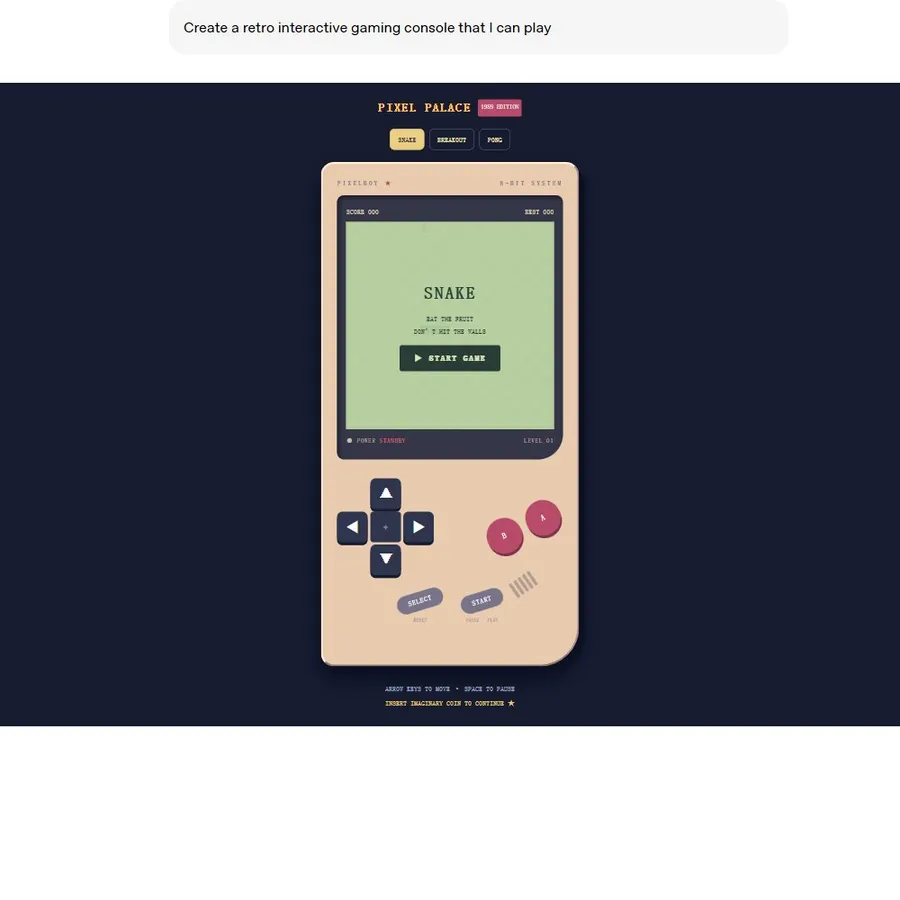
The preview is an official published example, not a live ChatGPT conversation. Loading connects to OpenAI’s CDN.
The prompt displayed in the official demo is:
Create a retro interactive gaming console that I can play
The ten recipes below are our suggested starting requests. They have not been individually tested, and none promises an identical result to the official console.
1. Snake
A small arcade loop: move, collect items and avoid collisions. Snake appears in OpenAI’s published retro console.
Create a simple Snake game directly in this ChatGPT conversation using Intelligent UI if available. Include clear start, pause and restart controls, a score and visible direction buttons for touch input. Explain the collision rules. If the game cannot render here, say so and offer a chat-playable alternative.
What to check: Check direction controls, collision behavior and restart. Mobile controls may differ from keyboard controls.
2. Breakout
A paddle-and-ball game where the player clears a wall of bricks. Breakout is another option in the official console.
Create a compact Breakout-style game in this conversation if supported. Include a paddle, ball, bricks, score, three lives and restart. Show the controls before play and provide touch controls where possible. Keep the rules short.
What to check: Test paddle movement and what happens after the ball leaves the play area.
3. Pong
A short rally against a computer-controlled paddle. Pong is the third game labelled in the official arcade.
Create a single-player Pong-style game directly in this chat if interactive gameplay is supported. Let me move one paddle, use a simple computer opponent and play to five points. Include start, pause, score and restart, and explain the input controls.
What to check: Check the score limit, input method and whether restart clears the score.
4. Memory matching
Reveal pairs of cards and remember their positions. This is a suggested game concept, not a captured official example.
Create an interactive memory matching game with six pairs of cards. Let me reveal two cards at a time, keep matched pairs visible and track turns. Use labelled symbols, include a restart control and keep all interactions in this chat if supported.
What to check: Try selecting the same card twice and restarting midway through a game.
5. Trivia quiz
Choose an answer, see an explanation and track a score. Our existing quiz page has a separately tested learning example.
Create a five-question general-knowledge quiz I can answer in this conversation. Ask one multiple-choice question at a time, explain the correct answer after I choose, track my score and offer a restart. Keep questions suitable for beginners and identify any fact you cannot verify.
What to check: Verify the answer key and make sure feedback explains the answer rather than only marking it.
See the tested quiz prompt, screenshots and playable website demo.
6. Word guessing
A turn-based word puzzle with a fixed number of attempts. It can work through chat even when a graphical grid is unavailable.
Create a five-letter word guessing game with six attempts. Define the repeated-letter feedback rules and show a readable guess history. Use an interactive input if available, otherwise let me submit guesses as chat messages. Keep the chosen answer fixed for the round and let me restart.
What to check: State how repeated letters are handled and whether guesses must come from a word list.
7. Tic-tac-toe
A small board game with clear turn, win and draw states. This is a suggested interface recipe.
Create a tic-tac-toe game in this conversation with a selectable 3-by-3 board if supported. Let me play against a simple computer opponent. Show whose turn it is, detect wins and draws, prevent occupied-square moves and add restart.
What to check: Reject moves to occupied squares and stop accepting moves after the round ends.
8. Text adventure
Explore a fictional scene through choices. Buttons can make the available actions easier to scan.
Run a short family-friendly mystery adventure in this chat. Start in a fictional museum after closing time. Give me three labelled choices per turn, use buttons if supported, keep a small inventory and make each choice affect the next scene. Allow a text reply when buttons are unavailable.
What to check: Keep inventory and location consistent after a choice; provide a text fallback for actions.
9. Logic puzzle
Work through clues rather than reacting quickly. A revealable hint can support different difficulty levels.
Create a small logic puzzle for three fictional people, three pets and three homes. Give consistent clues with one solution. Let me reveal one hint at a time and check my answer, using interactive controls if available. Explain the solution only when I request it.
What to check: Ensure the puzzle has a consistent solution and that hints do not contradict the clues.
10. Number guessing
A simple stateful loop: guess, receive higher-or-lower feedback, and try again.
Create a number guessing game from 1 to 100. Choose one fixed secret number per round, let me enter guesses and give higher-or-lower feedback. Track attempts, reject out-of-range values and include restart. Use an interactive input directly in this conversation if supported.
What to check: Check the allowed range, attempts and whether the chosen number remains fixed.
Test the Controls, Rules and Restart
Begin with a short round and a small feature set. A game should make its state clear: what happened, whose turn is next and how the round ends. Try an invalid action, complete a round and restart before asking for more levels or effects.
If a control produces an error, check whether the board or question already changed before repeating the action. For a missing interface, check Chat mode and the supported reasoning settings in the troubleshooting guide.
Frequently asked questions
Which Intelligent UI games did OpenAI demonstrate?
OpenAI’s published retro arcade has Snake, Breakout and Pong options. The remaining ideas on this page are suggested game recipes, not official examples.
Will all ten games render inside ChatGPT?
A prompt does not guarantee a particular game engine or interface. Availability and the requested task affect the result. Several recipes offer a turn-based text fallback.
Are these official game prompts?
Only the short prompt explicitly labelled as displayed in OpenAI’s demo is an official example. The ten longer recipes are suggestions from this guide and have not been individually tested.
Can I play on my phone?
The official arcade includes on-screen controls. For your own generated game, ask for touch controls and test them on the device you intend to use.
Official sources
Keep exploring
- Try our tested solar system quiz
- Turn a quiz into a learning task
- Check failed game controls
- Explore other Intelligent UI features
- Compare the official game with other examples