Retirement Savings Calculator: OpenAI’s Official Demo
The published example models a Roth IRA with monthly contributions and a constant assumed return. It separates the money contributed from illustrative investment growth, so you can see what changes when you adjust time or deposits.
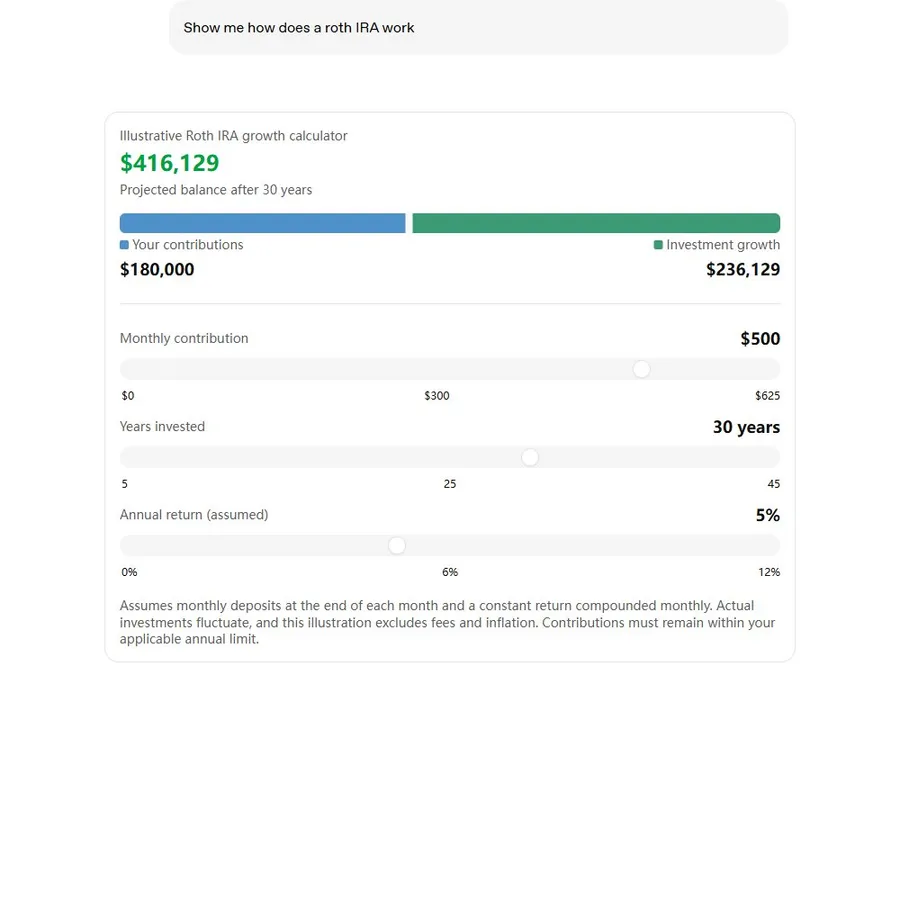
The preview is an official published example, not a live ChatGPT conversation. Loading connects to OpenAI’s CDN.
The prompt displayed by OpenAI’s original demonstration is:
Show me how does a roth IRA work
That short question is the published demo prompt, not a guarantee that repeating it will produce an identical widget. The example is a teaching illustration rather than a personalized retirement plan.
How to Adjust the Savings Calculator Parameters
- Monthly contribution: change the amount added each month and inspect the contribution total.
- Years invested: change the duration while keeping the other assumptions fixed.
- Assumed annual return: compare scenarios, treating the rate as an input rather than a forecast.
OpenAI’s demo assumes deposits at the end of each month and monthly compounding of a constant return. It excludes fees and inflation and notes that applicable contribution limits still matter. Read the assumptions in the original demo.
For a simple arithmetic check, set assumed return to zero: projected balance should equal the initial balance plus monthly contribution × 12 × years. This is a useful verification for a generated calculator, not a statement about future returns.
Create Your Own ChatGPT Savings Calculator
Use Chat with Intelligent UI available. Name the inputs, the compounding convention and the outputs you want, then ask to see the assumptions alongside the result. This longer recipe is suggested by our guide, not copied from OpenAI’s demonstration:
Create an interactive savings calculator directly in this conversation using Intelligent UI. Use an initial balance of $0, monthly deposits of $200, 20 years and an illustrative annual return of 4%. Let me edit all four inputs. Assume deposits at the end of each month and monthly compounding. Show contributions, projected growth and total separately. Include a zero-return case and explain that the scenario excludes fees and inflation.
Test one input at a time. If the controls fail or you receive code, follow the troubleshooting guide. A generated interface and its calculations both need checking.
Loan and Mortgage Calculator Prompts
A loan scenario needs principal, term and interest assumptions. Mortgage costs can also include taxes, insurance and fees, so ask the calculator to identify what is included rather than presenting the payment as the whole cost.
Create an educational fixed-rate loan calculator in this chat. Let me edit principal, annual interest rate and term in months. Show the principal-and-interest monthly payment and total interest using a fully amortizing loan formula. Handle a zero interest rate and label taxes, insurance and fees as excluded. Show the formula so I can verify it.
This is a proposed calculator recipe, not an official loan or mortgage demonstration.
Travel Budget Calculator Prompt
A travel calculator is useful when the arithmetic is simple but several assumptions change: nights, people, transport, accommodation and daily spending. Keep the currency and per-person versus group costs explicit.
Create an interactive travel budget calculator in this chat using one currency. Let me edit travelers, nights, accommodation per night, transport for the group and daily food cost per traveler. Show a group total and per-person total, list the formula, and label all entered costs as estimates.
For shared expenses after the trip, the bill splitter guide covers payer and participant rules.
Compare Investment Return Scenarios
Scenario comparison helps you see how an assumed rate changes a calculation. It does not estimate the likelihood of that rate. Keep deposits and time fixed when comparing rates so you can identify what caused the difference.
Compare illustrative savings scenarios using the same initial balance, monthly deposit and duration, with assumed annual returns of 0%, 2% and 4%. Show contributions separately from growth, use the same compounding convention throughout and explain the assumptions. Do not treat the rates as forecasts.
The additional prompts on this page have not been independently tested. They provide a precise starting request you can adapt and verify.
Frequently asked questions
What is the official ChatGPT savings calculator example?
OpenAI’s launch demo is an illustrative Roth IRA growth calculator. It has controls for monthly contributions, years invested and an assumed annual return.
Is the prompt below OpenAI’s original prompt?
The short prompt displayed in the official demo is reproduced and attributed. The longer calculator recipe is our suggested prompt, not OpenAI’s original transcript or a separately tested result.
Does an interactive projection guarantee an investment return?
No. The official demonstration uses a constant assumed return. Its calculation excludes fees and inflation, and actual investments fluctuate.
Can ChatGPT create other calculators?
You can request calculators for a defined task. Mortgage, travel-budget and scenario-comparison prompts here are suggestions; outputs and available interactions can vary.
Official sources
Keep exploring
- Try the ChatGPT bill splitter
- Learn to test interactive controls
- Choose a chart for your results
- Fix missing or failed widgets
- Compare calculators with other examples