Try OpenAI’s Intelligent UI Bill Splitter
The official launch example uses a clipboard-style layout for a dinner party of five. It includes guest names, dish prices and controls for choosing who shared each item. It is different from an equal split: a shared dish is divided among its selected guests.
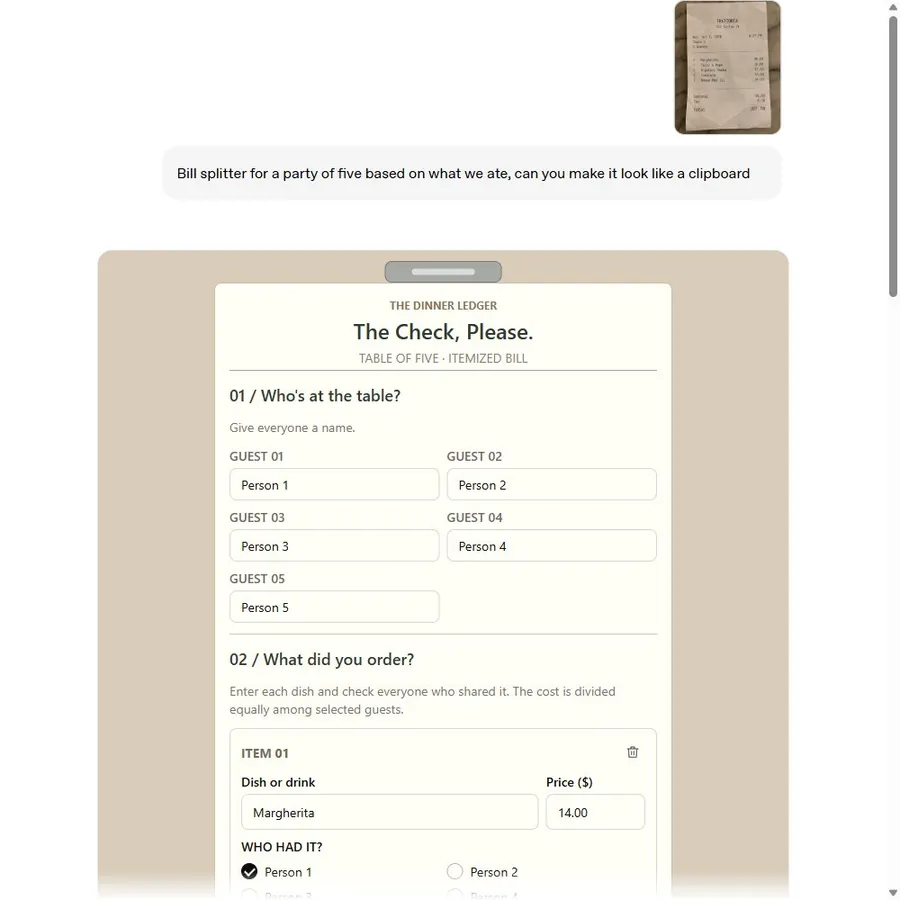
The preview is an official published example, not a live ChatGPT conversation. Loading connects to OpenAI’s CDN.
Explore the published demo here or open it on OpenAI’s CDN. It illustrates the feature; it does not run a new ChatGPT conversation or guarantee that your generated interface will match.
How to Create a ChatGPT Bill Splitter
- Open ChatGPT in Chat with Intelligent UI available.
- Specify the currency, bill amount, tip rule and number of people.
- Ask for editable inputs and a live total. For itemized splitting, specify who shared each item.
- Change one value and check that the total and shares update.
Copy our tested equal-split prompt
Create an interactive bill splitter I can use directly in this conversation, using Intelligent UI rather than a code block or Canvas. Use English for every label and all explanations. Start with a $120 dinner bill, 18% tip, and 4 people. Let me change the bill, tip percentage, and number of people, and show the total and amount per person updating live. Keep the explanation brief.
Our separate test produced $35.40 per person for a $120 bill, 18% tip and four people. Changing the tip to 20% produced $36.00. See the screenshots and test steps.
Ask for an itemized split
This suggested prompt adapts the official dinner example; it is not the original prompt transcript:
Create an interactive itemized bill splitter directly in this chat. Let me add five guests, dishes, prices and the guests who shared each dish. Divide each item equally among its selected guests. Add separate tax and tip inputs, state how they are allocated, and show each guest’s subtotal and final share. Include a check that the shares add up to the bill total.
Check Tax, Tip and Rounding Before Paying
Three rules make the calculator easier to trust: state whether the tip applies before or after tax, decide how shared dishes are divided, and reconcile rounding at the end. A neat interface does not resolve an ambiguous splitting rule.
For an equal split, verify bill × (1 + tip rate) ÷ people when there is no separate tax or fee. For itemized splits, verify that each dish is assigned and the sum of the final shares matches the amount you owe.
Adapt the Bill Splitter for Rent and Travel Costs
Rent may need fixed percentages rather than equal shares. Travel costs may need a record of who paid, who benefited and the currency for each expense. These are proposed use cases; the published official example covers a restaurant bill.
Create a shared travel expense calculator in this conversation. Use one currency. For each expense, let me enter the amount, payer and participating travelers. Show each person’s paid total and owed total, then calculate the net balance. Explain the allocation rules and make the sum of all net balances zero.
Before using it for a real trip, test a shared expense and an expense paid for only one traveler. Keep the original receipts so you can check the result.
Frequently asked questions
Can ChatGPT split an itemized restaurant bill?
OpenAI’s published bill splitter lets you assign dishes to the people who shared them. Ask for item assignment, tax and tip rules explicitly, then verify the sum of all shares.
Does the official demo send payments?
The published example is a calculator and split summary, not a payment service. Agree on the final amounts and use your normal payment method separately.
Can I split rent or travel expenses?
You can ask for a calculator tailored to those rules. The prompts below are suggested adaptations, not official demonstrations or separately tested outcomes.
What if the amounts do not add up?
Check item ownership, the tax and tip basis, and rounding. Ask the tool to show the original total, allocated total and any rounding remainder before using the result.
Official sources
Keep exploring
- Follow our tested bill splitter tutorial
- Explore more ChatGPT calculators
- Browse tested Intelligent UI prompts
- Troubleshoot a failed control
- Compare the bill splitter with other examples